Pledge Online
Form may take a moment to load.
|
Option 1: Pledge Only
If you only want to pledge (and not pay online) use this form, and check the "Make non-recurring payments with cash/check/other" box. 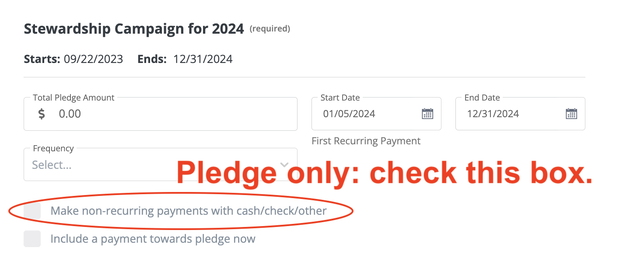
|
Option 2: Pledge and Set Up Online Payment
Note: there have been some glitches with setting up payment online using this form. We are sorry! To pledge and set up online payments, use the Sustaining Donor form and check the box that says "Make this my 2024 pledge." |
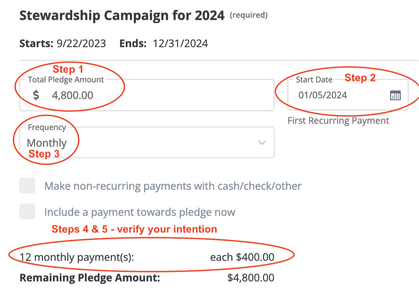
- Instructions for form on this page
- Step 1: Enter 2024 total
- Step 2: Change start date from today's date to 1/5/24 (or other start date of choice)
- Step 3: Select gift frequency (monthly, quarterly, etc.)
- Step 4: The form will automatically break down your total 2024 pledge into the increments you select... then
- Step 5: Verify this matches your intention. If the numbers don't look right to you, either adjust the total or the frequency.